GenAuth DocsDocuments
Concepts
User Guide
Development Integration
AgentAuth
Metadata
Development Integration
Multi-tenant (beta)
Console Documentation
Multi-tenant Console
Tenant Console
Saas Application Demo
Concepts
User Guide
Development Integration
AgentAuth
Metadata
Development Integration
Multi-tenant (beta)
Console Documentation
Multi-tenant Console
Tenant Console
Saas Application Demo
Old version
User Guide
  • Quick Start

  • Authentication

  • Access Control

  • Authorization

  • Adaptive MFA

  • User Account Management

  • User Directory Management

  • Applications

  • Become a Federation Authentication Identity Provider

  • Connect External Identity Providers (IdP)

  • WeChat Ecosystem Full Scenario Capabilities

  • Migrate Users to GenAuth

  • Security Settings

  • Branding

  • Automation

  • Audit Logs

  • Setting

  • FAQ

¶ Manage user custom data

Update time: 2025-07-23 07:34:21
Edit

Path: Settings->Field Management->User Field Management->User Extended Field

User custom fields are additional fields that can be added to user objects in addition to basic user fields. Developers can store a small amount of business-related data by setting custom fields.

¶ Configure custom user fields

You can define the following types of custom fields:

  • String;
  • Numeric;
  • Date;
  • Boolean;
  • Enumeration;
  1. Create custom extended fields

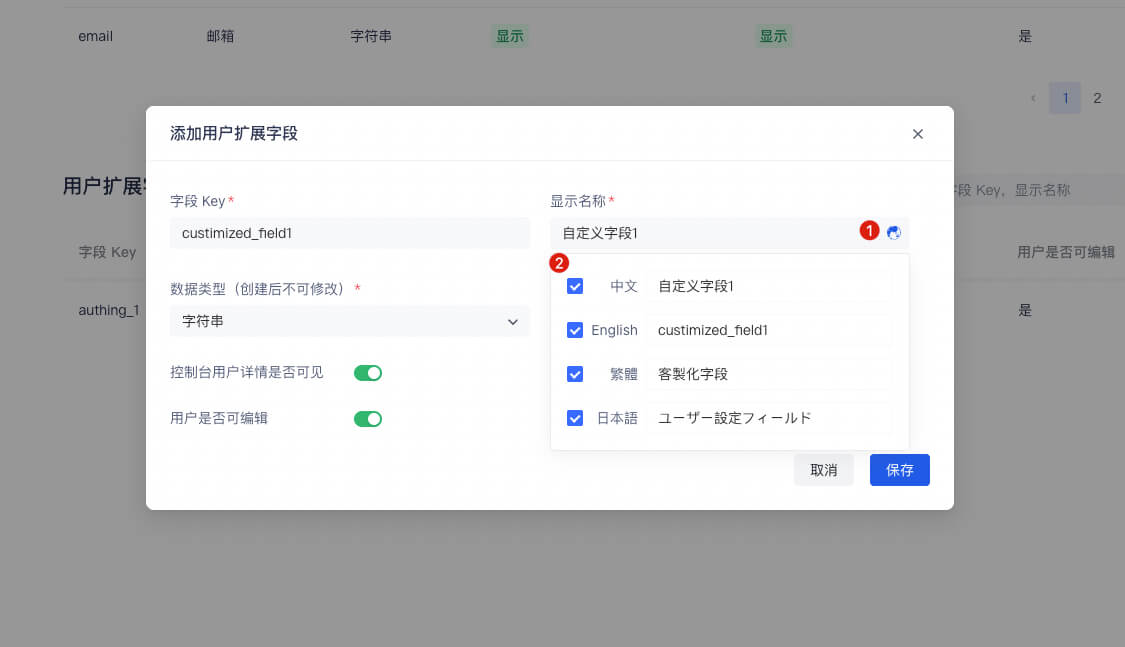
You can configure custom user fields in the Add user extended field window:

![](../images/extend-column.png)

When naming a newly created custom field, you can edit the display name of the field in multiple languages:

- Edit directly in the input box under "Display name" to get the default displayed field name
- Check "Chinese" and edit the field display name in the Chinese environment
- Check "English" and edit the field display name in the English environment
- Check "Traditional" and edit the field display name in the Traditional Chinese environment
- Check "Japanese" and edit the field display name in the Japanese environment

In particular, if the display environment of the field is not included in the range of the above four language environments, the "default displayed field name" you configured will be used for display.
  1. After configuring custom fields, you can open the registration information completion page of the application and let users complete the information of these custom fields.

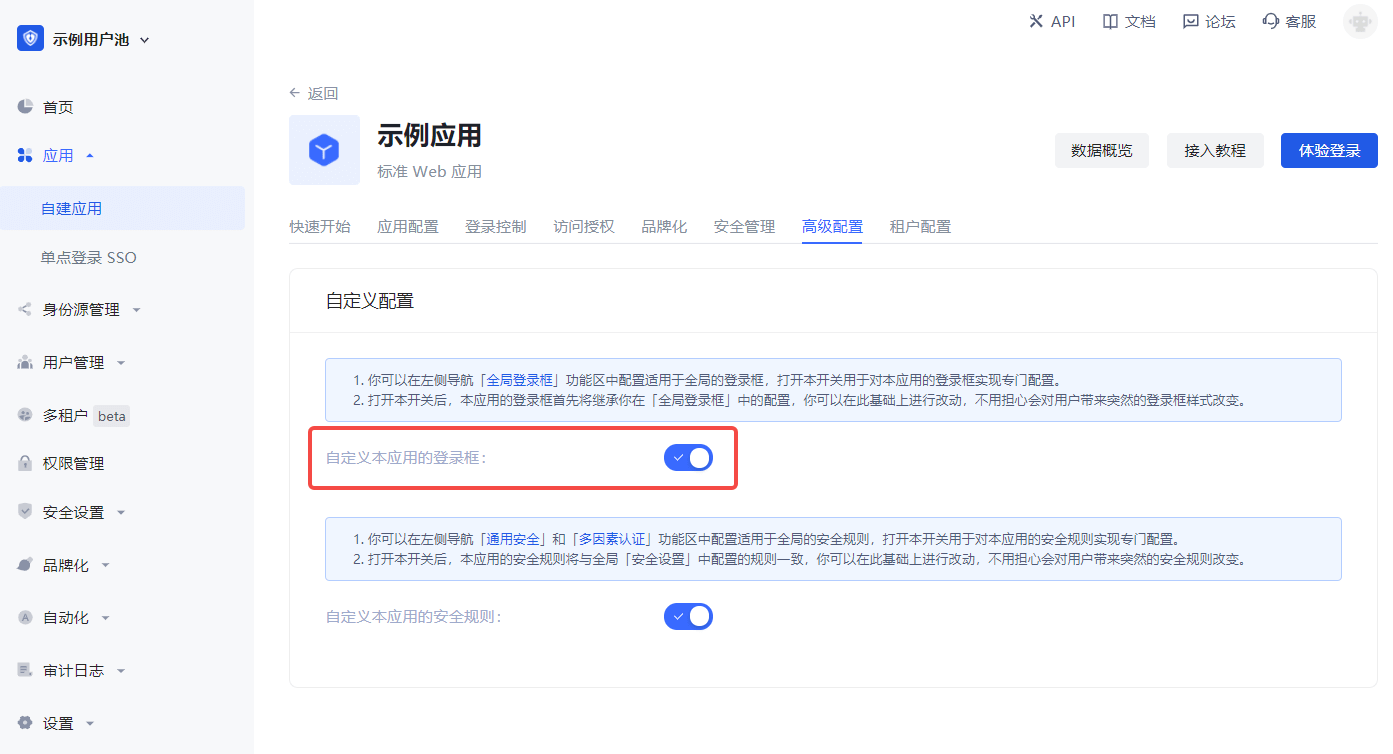
    a. In Application->Self-built application->Application details page->Advanced configuration tab, turn on the Customize the login box of this application switch.
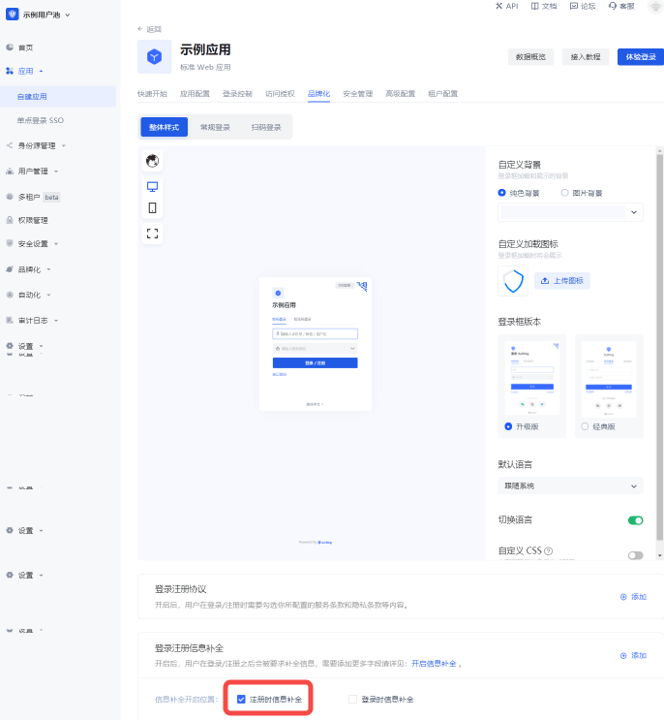
    b. Then switch to Branding and check the Complete information during registration switch in the Login registration information completion module.
    c. Add custom fields:

    d. Click Save.

  2. Visit the app's login page.
    After the user clicks register, he will jump to the following registration information completion page:

After the user successfully registers, you can see the custom field value just entered by the user on the user details page:

¶ Use API & SDK to manage user custom data

GenAuth supports SDKs in multiple programming languages including Java, JavaScript/Node.js, Python, PHP, C#, Swift, Go, Ruby, WeChat Mini Program, etc. You can choose the SDK you are familiar with:

  • Java/Kotlin
  • JavaScript/Node.js
  • Python
  • PHP
  • C#
  • Swift
  • Go
  • Ruby
  • WeChat Mini Program
Select language
Java
Loading...

Use the UserPool ID and AppID to initialize the AuthenticationClient of the Java SDK:

import cn.genauth.core.auth.AuthenticationClient;
// Initialize with AppId and appHost
AuthenticationClientOptions options = new AuthenticationClientOptions();
options.setAppId(GEN_AUTH_APP_ID);
options.setAppHost(GEN_AUTH_APP_HOST);
AuthenticationClient client = new AuthenticationClient(options);

First, get the AccessToken (opens new window) from the object returned after calling the SDK login successfully and assign it to the AuthenticationClient:

authenticationClient.setAccessToken("GEN_AUTH_ACCESSTOKEN");

Set custom fields in an entity class:

CustomData class:

public class CustomData {
    private String school;
    public CustomData() {}
    public String getSchool() { return school; }
    public void setSchool(String school) { this.school = school; }
}

updateProfile method:

UpdateUserProfileDto updateUserProfileDto = new UpdateUserProfileDto();
CustomData customData = new CustomData();
customData.setSchool("YOUR_SCHOOL");
updateUserProfileDto.setCustomData(customData);
authenticationClient.updateProfile(updateUserProfileDto);

Get the latest custom data of the user:

GetProfileDto getProfileDto = new GetProfileDto();
// Set to get user custom data
getProfileDto.setWithCustomData(true);
UserSingleRespDto userSingleRespDto = authenticationClient.getProfile(getProfileDto);
CustomData res = (CustomData)userSingleRespDto.getData().getCustomData();
  • Configure custom user fields
  • Use API & SDK to manage user custom data

User identity management

Integrated third-party login
Customized authentication process

Enterprise internal management

Single sign-on
Multi-factor authentication
Permission management

Developer

Development Documentation
GitHub (opens new window)

Company

official@genauth.ai
16th Floor, Building B, Beichen Century Center, Chaoyang District, Beijing (Total)
Room 406, 4th Floor, Block B, No. 200, Tianfu Fifth Street, High-tech Zone, Chengdu (Branch)

© Beijing Steamory Technology Co., Ltd.