
¶ Login using user credentials
This document is automatically generated based on https://github.com/authing/authing-docs-factory based on the https://api-explorer.genauth.ai V3 API, and is consistent with the API parameters and return results. If this document description is incorrect, please refer to the V3 API.
This endpoint is a login endpoint based on direct API calls, which is suitable for scenarios where you need to build your own login page. ** This endpoint does not currently support MFA, information completion, first password reset and other processes. If necessary, please use the OIDC standard protocol authentication endpoint. **
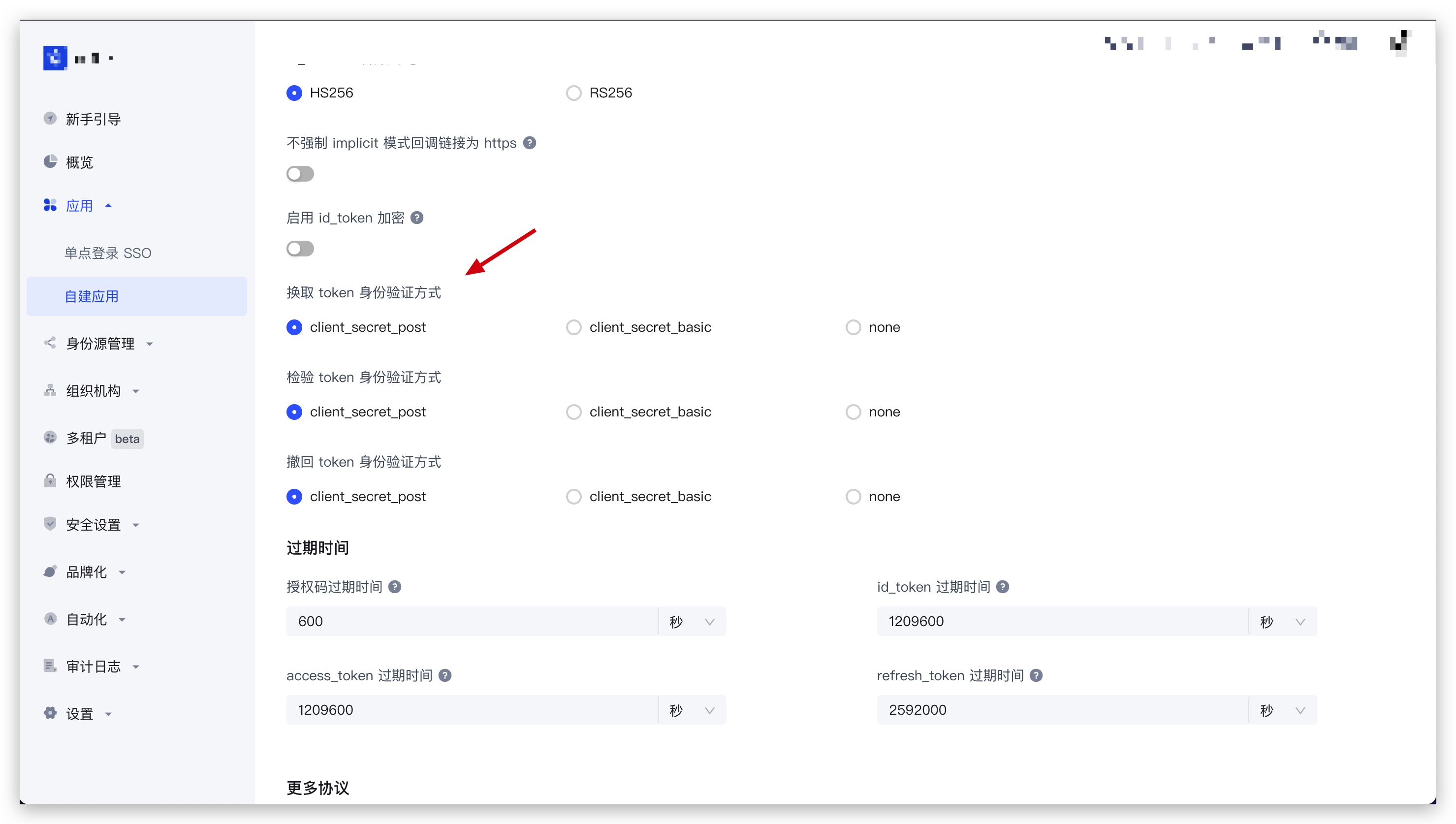
Note: Depending on the ** application type ** you selected when creating the application in GenAuth and the ** token exchange authentication method ** configured in the application, different forms of verification of the client's identity are required when calling this interface.
Click to expand details
You can find the Exchange token authentication method configuration item in Application - Self-built application - Application details - Application configuration - Other settings - Authorization configuration in the GenAuth console (opens new window):
Single-page web applications and client applications are hidden, and the default value is
none, which is not allowed to be modified; backend applications and standard web applications can modify this configuration item.
¶ When the exchange token authentication method is none
No additional operations are required to call this interface.
¶ When the exchange token authentication method is client_secret_post
When calling this interface, the client_id and client_secret parameters must be passed in the body as conditions for verifying the client identity. Among them, client_id is the application ID, and client_secret is the application secret key.
¶ When exchanging token authentication mode is client_secret_basic
When calling this interface, the authorization request header must be carried in the HTTP request header as a condition for verifying the client's identity. The format of the authorization request header is as follows (where client_id is the application ID, and client_secret is the application secret key.):
Basic base64(<client_id>:<client_secret>)
Example result:
Basic NjA2M2ZiMmYzY3h4eHg2ZGY1NWYzOWViOjJmZTdjODdhODFmODY3eHh4eDAzMjRkZjEyZGFlZGM3
JS Code example:
"Basic " + Buffer.from(client_id + ":" + client_secret).toString("base64");
¶ Method name
AuthenticationClient.sign_in_by_credentials
¶ Request parameters
| Name | Type | Is it required? | Default value | Description | Sample value |
|---|---|---|---|---|---|
| connection | string | Yes | - | Authentication method: - PASSWORD: Use password authentication.- PASSCODE: Use one-time temporary verification code authentication.- LDAP: Use LDAP user directory authentication.- AD: Use Windows AD user directory authentication. | PASSWORD |
| passwordPayload | SignInByPasswordPayloadDto | No | - | This parameter is required when the authentication method is PASSWORD. | {"email":"test@example.com","password":"passw0rd"} |
| passCodePayload | SignInByPassCodePayloadDto | No | - | This parameter is required when the authentication method is PASSCODE. | {"email":"test@example.com","passCode":"passw0rd"} |
| adPayload | SignInByAdPayloadDto | No | - | This parameter is required when the authentication method is AD. | {"sAMAccountName":"test","password":"passw0rd"} |
| ldapPayload | SignInByLdapPayloadDto | No | - | This parameter is required when the authentication method is LDAP. | {"sAMAccountName":"test","password":"passw0rd"} |
| options | SignInOptionsDto | No | - | Optional parameters | {"passwordEncryptType":"none"} |
| client_id | string | No | - | Application ID. When the "token exchange authentication method" configuration of the application is client_secret_post, this parameter is required. | 6342b8537axxxx047d314109 |
| client_secret | string | No | - | Application secret key. When the "token exchange authentication method" configuration of the application is client_secret_post, this parameter is required. | 4203d30e5e915xxxxxx26c31c9adce68 |
¶ Request response
Type: LoginTokenRespDto
| Name | Type | Description |
|---|---|---|
| statusCode | number | Business status code, which can be used to determine whether the operation is successful. 200 means success. |
| message | string | Description |
| apiCode | number | Segmented error code, which can be used to get the specific error type (successful request does not return). For a detailed list of error codes, please see: API Code List (opens new window) |
| requestId | string | Request ID. Returned when the request fails. |
| data | LoginTokenResponseDataDto | Response data |
Example results:
{
  "statusCode": 200,
  "message": "Success",
  "requestId": "934108e5-9fbf-4d24-8da1-c330328abd6c",
  "data": {
    "scope": "openid profile",
    "access_token": "eyJhbGciOiJSxxxxx",
    "id_token": "eyJhbGxxxx",
    "refresh_token": "WPsGJbvpBjqXz6IJIr1UHKyrdVF",
    "token_type": "bearer",
    "expire_in": 7200
  }
}
¶ Data structure
¶ SignInByPasswordPayloadDto
| Name | Type | Is it required? | Description | Sample value |
|---|---|---|---|---|
| password | string | Yes | User password, not encrypted by default. All GenAuth APIs transmit passwords securely via the HTTPS protocol, which can ensure security to a certain extent. If you need a higher level of security, we also support RSA256 and the national secret SM2 password encryption methods. For details, see the optional parameter options.passwordEncryptType. | passw0rd |
| account | string | No | User account (username/phone number/email address) | test |
| string | No | Email address, case insensitive. | test@example.com | |
| username | string | No | Username (username) | test |
| phone | string | No | Phone number | 188xxxx8888 |
¶ SignInByPassCodePayloadDto
| Name | Type | Required | Description | Sample value |
|---|---|---|---|---|
| passCode | string | Yes | A one-time temporary verification code. You need to first call the send SMS or send email interface to obtain the verification code. | 123456 |
| string | No | Email address, case insensitive. | 114114 | |
| phone | string | No | Mobile phone number | 188xxxx8888 |
| phoneCountryCode | string | No | Mobile phone area code. This field is optional for mobile phone numbers in mainland China. The GenAuth SMS service does not currently support international mobile phone numbers. You need to configure the corresponding international SMS service in the GenAuth console. A complete list of mobile phone area codes can be found at https://en.wikipedia.org/wiki/List_of_country_calling_codes. | +86 |
¶ SignInByAdPayloadDto
| Name | Type | Required | Description | Sample value |
|---|---|---|---|---|
| password | string | Yes | User password, unencrypted by default. All GenAuth APIs transmit passwords securely via HTTPS, which can ensure security to a certain extent. If you need a higher level of security, we also support RSA256 and national secret SM2 password encryption methods. For details, see the optional parameter options.passwordEncryptType. | passw0rd |
| sAMAccountName | string | Yes | sAMAccountName of the account in the Windows AD user directory | test |
¶ SignInByLdapPayloadDto
| Name | Type | Is it required? | Description | Sample value |
|---|---|---|---|---|
| password | string | Yes | User password, unencrypted by default. All GenAuth APIs transmit passwords securely via HTTPS, which can ensure security to a certain extent. If you need a higher level of security, we also support RSA256 and national secret SM2 password encryption methods. For details, see the optional parameter options.passwordEncryptType. | passw0rd |
| sAMAccountName | string | Yes | sAMAccountName of the account in the LDAP AD user directory | 114114 |
¶ SignInOptionsDto
| Name | Type | Is this field required? | Description | Sample value |
|---|---|---|---|---|
| scope | string | no | The permissions that need to be requested, must include openid. If you need to obtain the mobile phone number and email, you need to include phone email; if you need refresh_token, you need to include offline_access. Please separate multiple scopes with spaces. The decoded content of id_token will contain the user information related fields corresponding to these scopes. - openid: Must be included.- profile: Returns birthdate, family_name, gender, given_name, locale, middle_name, name, nickname, picture, preferred_username, profile, updated_at, website, zoneinfo fields.- username: Returns username.- email: Returns email, email_verified.- phone: Returns phone_number, phone_number_verified.- offline_access: If this parameter exists, the token interface will return the refresh_token field.- roles: Returns the user's role list.- external_id: User ID of the original system.- extended_fields: Returns the user's extended field information, the content is an object, the key is the extended field name, the value is the extended field value.- tenant_id: Returns the user's tenant ID. | openid profile |
| clientIp | string | No | The real IP address of the client. By default, GenAuth will identify the IP address of the request source as the IP address of the user's login. If you call this interface in the backend server, you need to set this IP to the user's real request IP. | 192.168.0.1 |
| context | object | No | Additional request context, which will be passed to the context object of Pipeline (opens new window) before and after authentication. Learn how to get additional context passed in to the context parameter of Pipeline. | {"source":"utm"} |
| tenantId | string | No | Tenant ID | 625783d629f2bd1f5ddddd98c |
| customData | object | No | To set additional user custom data, you need to configure custom data (opens new window) in the GenAuth console first. | {"school":"pku","age":"20"} |
| autoRegister | boolean | No | Whether to enable automatic registration. If set to true, an account will be automatically created for the user if it does not exist. Note: This parameter is only valid for the specified username and password, email password, and mobile phone number password. This parameter cannot be set for general account passwords. | |
| captchaCode | string | No | Captcha graphic verification code, case-insensitive. When the security policy is set to verification code and the limit on failed logins is triggered, you will need to fill in the graphic verification code for the next login. | a8nz |
| passwordEncryptType | string | No | Password encryption type, supports RSA256 and SM2 algorithms. The default is none, no encryption.- none: Do not encrypt the password, use plain text for transmission.- rsa: Use RSA256 algorithm to encrypt the password, you need to use the RSA public key of the GenAuth service for encryption, please read the Introduction section to learn how to obtain the RSA256 public key of the GenAuth service.- sm2: Use SM2 algorithm (opens new window) to encrypt the password, you need to use the SM2 public key of the GenAuth service for encryption, please read the Introduction section to learn how to obtain the SM2 public key of the GenAuth service. | sm2 |
¶ LoginTokenResponseDataDto
| Name | Type | Is it required? | Description | Sample value |
|---|---|---|---|---|
| scope | string | No | Scope corresponding to access_token | openid profile |
| access_token | string | No | API call credentials, authorized to access resource API within a limited time | eyJhbGciOiJSxxxxx |
| id_token | string | No | User's identity credentials, which will contain user information after parsing | eyJhbGxxxx |
| refresh_token | string | No | refresh_token is used to obtain a new AccessToken | WPsGJbvpBjqXz6IJIr1UHKyrdVF |
| token_type | string | Yes | token type | bearer |
| expire_in | number | yes | expiration time in seconds | 7200 |