GenAuth DocsDocuments
Concepts
User Guide
Development Integration
AgentAuth
Metadata
Development Integration
Multi-tenant (beta)
Console Documentation
Multi-tenant Console
Tenant Console
Saas Application Demo
Concepts
User Guide
Development Integration
AgentAuth
Metadata
Development Integration
Multi-tenant (beta)
Console Documentation
Multi-tenant Console
Tenant Console
Saas Application Demo
Old version
User Guide
  • Quick Start

  • Authentication

    • Overview
    • Username Password Authentication
    • SMS Code Authentication
    • Social Login Authentication
    • QR Code Login

      • Use Self-built App for QR Code Login

      • Use WeChat Mini Program for QR Code Login
    • Authentication in Mini Programs
    • Implement Single Sign-On (SSO)
    • Mobile SSO
    • Multi-factor Authentication
    • Extend Authentication Process

    • Customize Login UI
  • Access Control

  • Authorization

  • Adaptive MFA

  • User Account Management

  • User Directory Management

  • Applications

  • Become a Federation Authentication Identity Provider

  • Connect External Identity Providers (IdP)

  • WeChat Ecosystem Full Scenario Capabilities

  • Migrate Users to GenAuth

  • Security Settings

  • Branding

  • Automation

  • Audit Logs

  • Setting

  • FAQ

  1. User Guide
  2. /
  3. Authentication
  4. /
  5. QR Code Login
  6. /
  7. Use WeChat Mini Program for QR Code Login

¶ Use Mini Program to scan QR code to log in to the website

Update time: 2025-07-23 07:34:21
Edit

The Mini Program to scan QR code to log in to the website is a groundbreaking design of GenAuth. After enabling scanning QR code to log in in GenAuth, you can obtain the official real-name user information of WeChat. Users can complete registration or login with their real number with one-click authorization, and establish an account system based on mobile phone numbers for developers.

  • Application scenario: PC website;
  • Overview: Display the Mini Program QR code in the PC website application, and then use WeChat to scan the QR code to log in to the application;
  • Advantages: You can obtain the mobile phone number and real-name information of WeChat users;

You can click here to experience the Mini Program scan code login (opens new window).
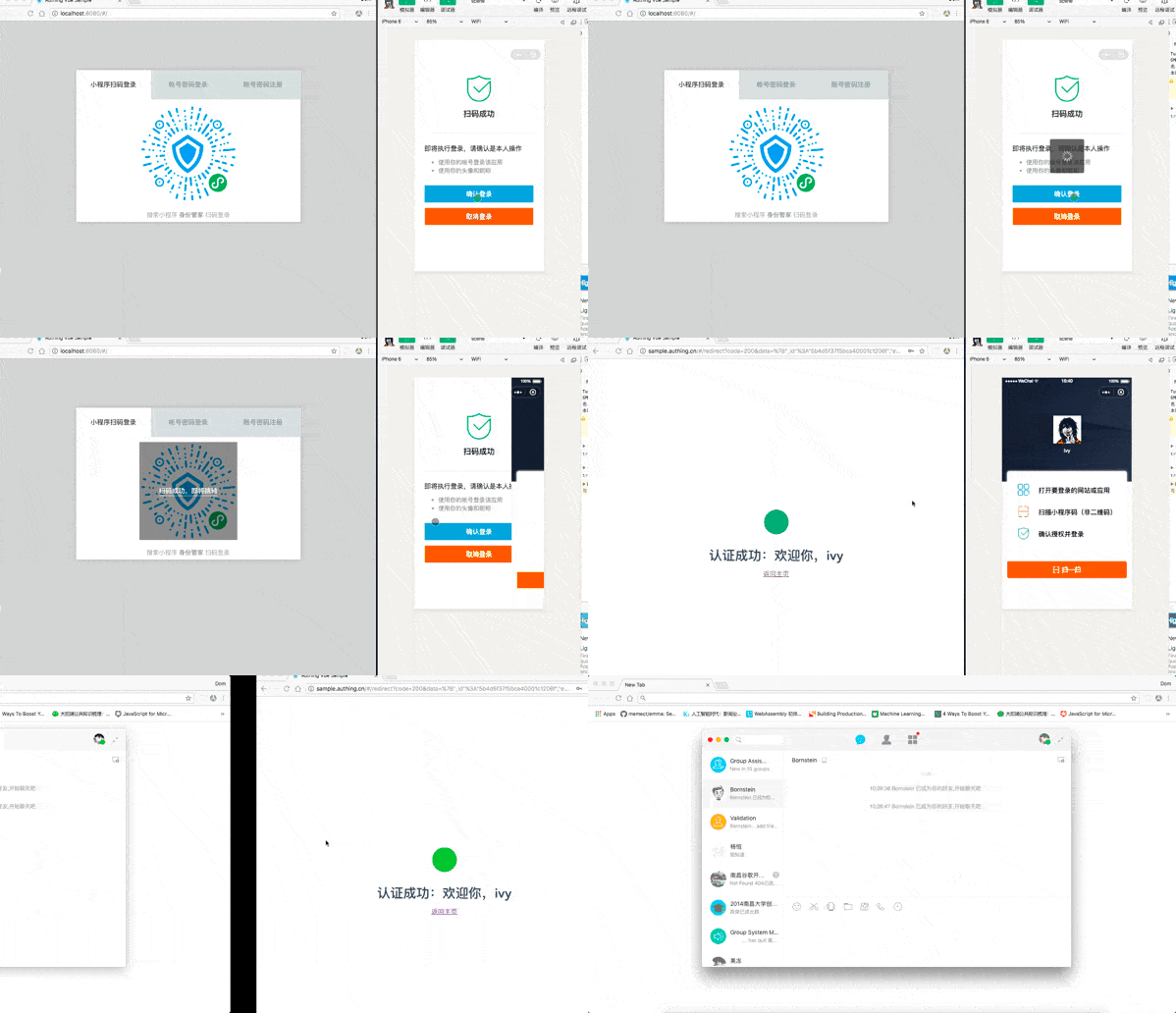
For the complete access process, please see: Log in by scanning the QR code on the PC website using the mini program.

Previous article: Custom Settings Next article: Authentication in Mini Programs

User identity management

Integrated third-party login
Customized authentication process

Enterprise internal management

Single sign-on
Multi-factor authentication
Permission management

Developer

Development Documentation
GitHub (opens new window)

Company

official@genauth.ai
16th Floor, Building B, Beichen Century Center, Chaoyang District, Beijing (Total)
Room 406, 4th Floor, Block B, No. 200, Tianfu Fifth Street, High-tech Zone, Chengdu (Branch)

© Beijing Steamory Technology Co., Ltd.