
¶ Use API & SDK to complete authentication
In the previous guide, you have learned how to use GenAuth hosted login page and embedded login component to implement the login and registration process. In addition, we also provide HTTP APIs in RESTful and GraphQL, as well as SDKs in more than ten different languages and frameworks. You can flexibly combine the authentication process you need based on these API & SDK resources.
¶ Select a familiar SDK
GenAuth supports SDKs in multiple programming languages including Java, JavaScript/Node.js, Python, PHP, C#, Swift, Go, Ruby, WeChat Mini Program, etc. You can choose the SDK you are familiar with:
¶ Initialize SDK
¶ Use SDK to authenticate users
Take the mobile phone verification code login (if the user account does not exist, an account will be created first) as an example:
First send the SMS verification code
Then use the mobile phone verification code to log in:
After successful login, you can get the user information of the user, where token is the user's identity credential. You should bring it with you when accessing your backend resources, and then verify the identity of this token on the backend.
¶ Verify user token
The token field of the user information is a standard OIDC IdToken. You can use application ID and Secret on the backend to verify this token.
Example token As follows:
eyJhbGciOiJIUzI1NiIsInR5cCI6IkpXVCJ9.eyJzdWIiOiI1ZjIxNTFiZWFlNWE4YjRjZTZiMGJhZTkiLCJiaXJ0aGRhdGUiOiIiLCJmYW1pbHlfbmFtZSI6IiIsImdlbmRlciI6IiIsImdpdmVuX25hbWUiOiIiLCJsb2NhbGUiOiI iLCJtaWRkbGVfbmFtZSI6IiIsIm5hbWUiOiIiLCJuaWNrbmFtZSI6IiIsInBpY3R1cmUiOiJodHRwczovL3VzZXJjb25 0ZW50cy5hdXRoaW5nLmNuL2F1dGhpbmctYXZhdGFyLnBuZyIsInByZWZlcnJlZF91c2VybmFtZSI6InRlc3RAZXhhbXBs ZS5jb20iLCJwcm9maWxlIjoiIiwidXBkYXRlZF9hdCI6IjIwMjEtMDEtMThUMDc6NDg6NTUuNzgxWiIsIndlYnNpdGUi OiIiLCJ6b25laW5mbyI6IiIsImFkZHJlc3MiOnsiY291bnRyeSI6IiIsInBvc3RhbF9jb2RlIjoiIiwicmVnaW9uIjoiI iwiZm9ybWF0dGVkIjoiIn0sInBob25lX251bWJlciI6bnVsbCwicGhvbmVfbnVtYmVyX3ZlcmlmaWVkIjpmYWxzZSwiZ W1haWwiOiJ0ZXN0QGV4YW1wbGUuY29tIiwiZW1haWxfdmVyaWZpZWQiOmZhbHNlLCJkYXRhIjp7InR5cGUiOiJ1c2VyIi widXNlclBvb2xJZCI6IjVhOWZhMjZjZjg2MzVhMDAwMTg1NTI4YyIsImFwcElkIjoiNjAwNTNiNzQxNjQ3OGRlMmU4OG ZhYjQzIiwiaWQiOiI1ZjIxNTFiZWFlNWE4YjRjZTZiMGJhZTkiLCJ1c2VySWQiOiI1ZjIxNTFiZWFlNWE4YjRjZTZiMGJ hZTkiLCJfaWQiOiI1ZjIxNTFiZWFlNWE4YjRjZTZiMGJhZTkiLCJwaG9uZSI6bnVsbCwiZW1haWwiOiJ0ZXN0QGV4YW1 wbGUuY29tIiwidXNlcm5hbWUiOiJ0ZXN0QGV4YW1wbGUuY29tIiwidW5pb25pZCI6bnVsbCwib3BlbmlkIjpudWxsLCJj bGllbnRJZCI6IjVhOWZhMjZjZjg2MzVhMDAwMTg1NTI4YyJ9LCJ1c2VycG9vbF9pZCI6IjVhOWZhMjZjZjg2MzVhMDAw MTg1NTI4YyIsImF1ZCI6IjYwMDUzYjc0MTY0NzhkZTJlODhmYWI0MyIsImV4cCI6MTYxMjE2NTg4OCwiaWF0IjoxNjEwO TU2Mjg4LCJpc3MiOiJodHRwczovL3NhbXBsZS1hcHAuYXV0aGluZy5jbi9vaWRjIn0.SNyGBffF-zBqDQFINGxUJZrWSAADHQhbEOsKvnH4SLg
You can decode this on this website (opens new window) (domestic users can access this mirror site (opens new window)) IdToken:
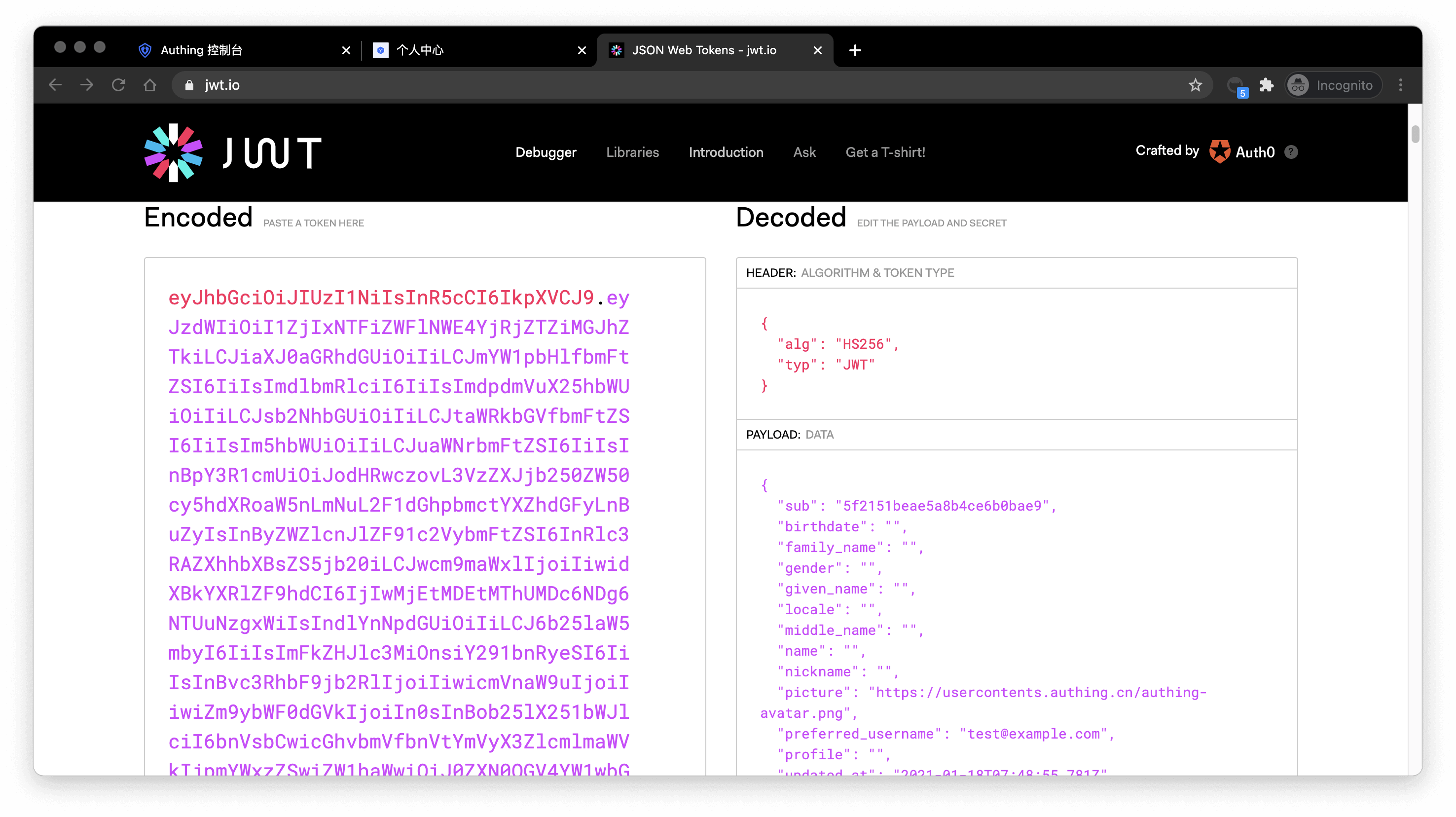
Basically all languages provide libraries for verifying IdToken. You can choose the language you are familiar with:
If the verification is successful, you can get the user information of the id_token, where the sub field is the user's ID and the aud field is the application's ID. You can click here to learn about the detailed meaning of each field of IdToken.
¶ Next
After identifying the user, you may also need to manage the user's permissions to determine whether the user has the permission to operate this API.